


MFRC-522 RC522 RFID RF IC card reader sensor module + 1 card


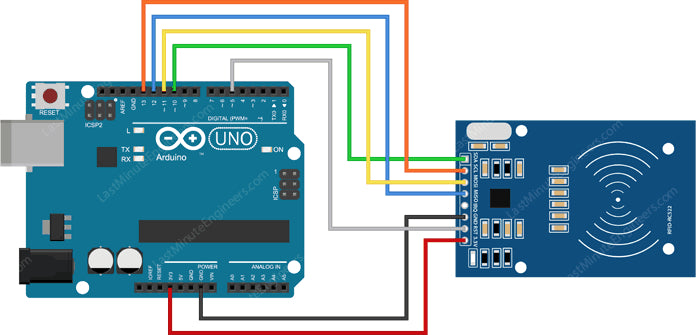
| #include <SPI.h> //include the SPI bus library |
| #include <MFRC522.h> //include the RFID reader library |
| #define SS_PIN 10 //slave select pin |
| #define RST_PIN 5 //reset pin |
| MFRC522 mfrc522(SS_PIN, RST_PIN); // instatiate a MFRC522 reader object. |
| MFRC522::MIFARE_Key key; //create a MIFARE_Key struct named 'key', which will hold the card information |
| //this is the block number we will write into and then read. |
| int block=2; |
| byte blockcontent[16] = {"KitsGuru"}; //an array with 16 bytes to be written into one of the 64 card blocks is defined |
| //byte blockcontent[16] = {0,0,0,0,0,0,0,0,0,0,0,0,0,0,0,0}; //all zeros. This can be used to delete a block. |
| //This array is used for reading out a block. |
| byte readbackblock[18]; |
| //https://kitsguru.myshopify.com/products/mifare-rfid-readerwriter-13-56mhz-rc522-spi-s50-fudan-card-and-keychain |
| void setup() { |
| Serial.begin(9600); // Initialize serial communications with the PC |
| SPI.begin(); // Init SPI bus |
| mfrc522.PCD_Init(); // Init MFRC522 card (in case you wonder what PCD means: proximity coupling device) |
| Serial.println("Scan a MIFARE Classic card"); |
| // Prepare the security key for the read and write functions. |
| for (byte i = 0; i < 6; i++) { |
| key.keyByte[i] = 0xFF; //keyByte is defined in the "MIFARE_Key" 'struct' definition in the .h file of the library |
| } |
| } |
| void loop(){ |
| // Look for new cards |
| if ( ! mfrc522.PICC_IsNewCardPresent()) { |
| return; |
| } |
| // Select one of the cards |
| if ( ! mfrc522.PICC_ReadCardSerial()) |
| { |
| return; |
| } |
| Serial.println("card selected"); |
| //the blockcontent array is written into the card block |
| writeBlock(block, blockcontent); |
| //read the block back |
| readBlock(block, readbackblock); |
| //uncomment below line if you want to see the entire 1k memory with the block written into it. |
| //mfrc522.PICC_DumpToSerial(&(mfrc522.uid)); |
| //print the block contents |
| Serial.print("read block: "); |
| for (int j=0 ; j<16 ; j++) |
| { |
| Serial.write (readbackblock[j]); |
| } |
| Serial.println(""); |
| } |
| //https://kitsguru.myshopify.com/products/mifare-rfid-readerwriter-13-56mhz-rc522-spi-s50-fudan-card-and-keychain |
| //Write specific block |
| int writeBlock(int blockNumber, byte arrayAddress[]) |
| { |
| //this makes sure that we only write into data blocks. Every 4th block is a trailer block for the access/security info. |
| int largestModulo4Number=blockNumber/4*4; |
| int trailerBlock=largestModulo4Number+3;//determine trailer block for the sector |
| if (blockNumber > 2 && (blockNumber+1)%4 == 0){Serial.print(blockNumber);Serial.println(" is a trailer block:");return 2;} |
| Serial.print(blockNumber); |
| Serial.println(" is a data block:"); |
| //authentication of the desired block for access |
| byte status = mfrc522.PCD_Authenticate(MFRC522::PICC_CMD_MF_AUTH_KEY_A, trailerBlock, &key, &(mfrc522.uid)); |
| if (status != MFRC522::STATUS_OK) { |
| Serial.print("PCD_Authenticate() failed: "); |
| Serial.println(mfrc522.GetStatusCodeName(status)); |
| return 3;//return "3" as error message |
| } |
| //writing the block |
| status = mfrc522.MIFARE_Write(blockNumber, arrayAddress, 16); |
| //status = mfrc522.MIFARE_Write(9, value1Block, 16); |
| if (status != MFRC522::STATUS_OK) { |
| Serial.print("MIFARE_Write() failed: "); |
| Serial.println(mfrc522.GetStatusCodeName(status)); |
| return 4;//return "4" as error message |
| } |
| Serial.println("block was written"); |
| } |
| //Read specific block |
| int readBlock(int blockNumber, byte arrayAddress[]) |
| { |
| int largestModulo4Number=blockNumber/4*4; |
| int trailerBlock=largestModulo4Number+3;//determine trailer block for the sector |
| //authentication of the desired block for access |
| byte status = mfrc522.PCD_Authenticate(MFRC522::PICC_CMD_MF_AUTH_KEY_A, trailerBlock, &key, &(mfrc522.uid)); |
| if (status != MFRC522::STATUS_OK) { |
| Serial.print("PCD_Authenticate() failed (read): "); |
| Serial.println(mfrc522.GetStatusCodeName(status)); |
| return 3;//return "3" as error message |
| } //https://kitsguru.myshopify.com/products/mifare-rfid-readerwriter-13-56mhz-rc522-spi-s50-fudan-card-and-keychain |
| //reading a block |
| byte buffersize = 18;//we need to define a variable with the read buffer size, since the MIFARE_Read method below needs a pointer to the variable that contains the size... |
| status = mfrc522.MIFARE_Read(blockNumber, arrayAddress, &buffersize);//&buffersize is a pointer to the buffersize variable; MIFARE_Read requires a pointer instead of just a number |
| if (status != MFRC522::STATUS_OK) { |
| Serial.print("MIFARE_read() failed: "); |
| Serial.println(mfrc522.GetStatusCodeName(status)); |
| return 4;//return "4" as error message |
| } |
| Serial.println("block was read"); |
|
} Physical Attributes
Package Includes
|


